Thursday, March 9, 2017
Testing a ReactJS component
Read this blog: https://semaphoreci.com/community/tutorials/testing-react-components-with-enzyme-and-mocha

Wednesday, March 8, 2017
How to test your web applications using Selenium Webdriver
Still working on this post....
How to setup Selenium, phantomJS, and chromedriver on mac?
brew install phantomjs
brew install chromedriver
brew install selenium-server-standalone
How to setup Selenium, phantomJS, and chromedriver on mac?
brew install phantomjs
brew install chromedriver
brew install selenium-server-standalone
How to setup Selenium, PhantomJS, and Chromedriver on mac/windows?
npm install selenium-webdriver
Download the needed drivers on to your local
For example,
download phantomjs driver from http://phantomjs.org/download.html
http://www.kenst.com/2015/03/installing-chromedriver-on-mac-osx/
Update the system path on your local pointing to the downloaded drivers
Make sure that JDK is installed on your local
Clone the following git repo and give it a try: https://github.com/umaar/webdriverjs-recipes
Saturday, February 11, 2017
ES6 - arrow functions, classes, template literals, let and const
Don't forget to install Scratch JS Chrome plugin to play around with ES6.
arrow functions:
Gemstones from MDN web site:
Read more on MDN web site
Not related but interesting...explanation about function declaration and function expressions.
Classes:
Gemstones from MDN web site:
arrow functions:
Gemstones from MDN web site:
- Arrow functions does not bind its own this, arguments, super or new.target.
- Arrow functions are always anonymous
- They cannot be used for constructor functions.
Read more on MDN web site
Not related but interesting...explanation about function declaration and function expressions.
Classes:
Gemstones from MDN web site:
- JavaScript classes provide much simpler syntax to create objects.
- A class can be created using either declaration or expression.
- Function declarations are hoisted, where as class declarations are not.
Template literals:
Gemstones from MDN web site:
- Template literals allow embedded expressions
- They help to create multi-line strings
- They are enclosed by the back tick
Tips while doing ReactJS programming
To create a component, use the following syntax:
const React = require('react')
const HelloWorld = React.createClass({})
or
const React = require('react')
class HelloWorld extends React.Component({})
or
const React = require('require')
const HelloWorld = (props) => {}
// this is a stateless functional component - no state or lifecycle methods
Read more about stateless functional components
If you notice, while using the React class or component, you pass an object with bunch of key value pairs to React's createClass or Component, and viola, the component is ready.
So, for example...
const HelloWorld = React.createClass({
// in a non es6 world
render : function(){
return <h1>Hello World</h1>
}
// or in es6 world
render : function(){
return <h1>Hello World</h1>;
}
})
What to provide in the bundle's pipeline entry point js file:
import statement to import React
import statement to import ReactDOM
References to all the React components that you developed and using
Tell ReactDOM to render your react stuff at a particular DOM element
Read more about bundling React application
const React = require('react')
const HelloWorld = React.createClass({})
or
const React = require('react')
class HelloWorld extends React.Component({})
or
const React = require('require')
const HelloWorld = (props) => {}
// this is a stateless functional component - no state or lifecycle methods
Read more about stateless functional components
If you notice, while using the React class or component, you pass an object with bunch of key value pairs to React's createClass or Component, and viola, the component is ready.
So, for example...
const HelloWorld = React.createClass({
// in a non es6 world
render : function(){
return <h1>Hello World</h1>
}
// or in es6 world
render : function(){
return <h1>Hello World</h1>;
}
})
What to provide in the bundle's pipeline entry point js file:
import statement to import React
import statement to import ReactDOM
References to all the React components that you developed and using
Tell ReactDOM to render your react stuff at a particular DOM element
Read more about bundling React application
Thursday, February 9, 2017
How in the world I can create a React application??
https://www.tutorialspoint.com/reactjs/index.htm has the basic steps in creating a basic react application.
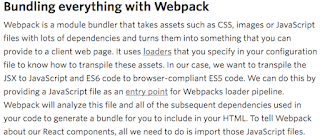
Also have patience to read this article entirely that gives an overall picture of moving parts used in react application setup: https://www.twilio.com/blog/2015/08/setting-up-react-for-es6-with-webpack-and-babel-2.html. See an excerpt from this web site below:
And following is my explanation:
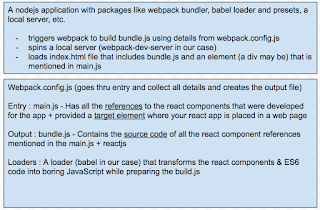
Golden words: "Babel transforms ES2015 and JSX into boring old JavaScript"
Also have patience to read this article entirely that gives an overall picture of moving parts used in react application setup: https://www.twilio.com/blog/2015/08/setting-up-react-for-es6-with-webpack-and-babel-2.html. See an excerpt from this web site below:

And following is my explanation:

Golden words: "Babel transforms ES2015 and JSX into boring old JavaScript"
JavaScript array prototype functions: map, filter, reduce
A nice site to learn JavaScript array prototype functions: map, filter, reduce.
Thursday, January 12, 2017
NodeJs, express, and express route
Came across this tutorial. Very self explanatory!!
Here is the simple and best example: https://alligator.io/nodejs/express-basics/
https://scotch.io/tutorials/learn-to-use-the-new-router-in-expressjs-4
https://codeforgeek.com/2015/05/expressjs-router-tutorial/
Here is the simple and best example: https://alligator.io/nodejs/express-basics/
https://scotch.io/tutorials/learn-to-use-the-new-router-in-expressjs-4
https://codeforgeek.com/2015/05/expressjs-router-tutorial/
Subscribe to:
Posts (Atom)