To create a component, use the following syntax:
const React = require('react')
const HelloWorld = React.createClass({})
or
const React = require('react')
class HelloWorld extends React.Component({})
or
const React = require('require')
const HelloWorld = (props) => {}
// this is a stateless functional component - no state or lifecycle methods
Read more about stateless functional components
If you notice, while using the React class or component, you pass an object with bunch of key value pairs to React's createClass or Component, and viola, the component is ready.
So, for example...
const HelloWorld = React.createClass({
// in a non es6 world
render : function(){
return <h1>Hello World</h1>
}
// or in es6 world
render : function(){
return <h1>Hello World</h1>;
}
})
What to provide in the bundle's pipeline entry point js file:
import statement to import React
import statement to import ReactDOM
References to all the React components that you developed and using
Tell ReactDOM to render your react stuff at a particular DOM element
Read more about bundling React application
Saturday, February 11, 2017

Thursday, February 9, 2017
How in the world I can create a React application??
https://www.tutorialspoint.com/reactjs/index.htm has the basic steps in creating a basic react application.
Also have patience to read this article entirely that gives an overall picture of moving parts used in react application setup: https://www.twilio.com/blog/2015/08/setting-up-react-for-es6-with-webpack-and-babel-2.html. See an excerpt from this web site below:
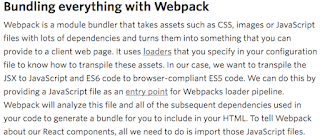
And following is my explanation:
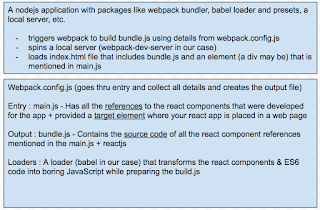
Golden words: "Babel transforms ES2015 and JSX into boring old JavaScript"
Also have patience to read this article entirely that gives an overall picture of moving parts used in react application setup: https://www.twilio.com/blog/2015/08/setting-up-react-for-es6-with-webpack-and-babel-2.html. See an excerpt from this web site below:

And following is my explanation:

Golden words: "Babel transforms ES2015 and JSX into boring old JavaScript"
JavaScript array prototype functions: map, filter, reduce
A nice site to learn JavaScript array prototype functions: map, filter, reduce.
Thursday, January 12, 2017
NodeJs, express, and express route
Came across this tutorial. Very self explanatory!!
Here is the simple and best example: https://alligator.io/nodejs/express-basics/
https://scotch.io/tutorials/learn-to-use-the-new-router-in-expressjs-4
https://codeforgeek.com/2015/05/expressjs-router-tutorial/
Here is the simple and best example: https://alligator.io/nodejs/express-basics/
https://scotch.io/tutorials/learn-to-use-the-new-router-in-expressjs-4
https://codeforgeek.com/2015/05/expressjs-router-tutorial/
Friday, December 16, 2016
Git branches
Found another good web site where I found good examples on Git branches!
https://www.atlassian.com/git/tutorials/using-branches
https://www.atlassian.com/git/tutorials/using-branches
Thursday, December 15, 2016
Git major commands
Came across this web site where they listed all the major Git commands:
https://www.siteground.com/tutorials/git/commands.htm
https://www.siteground.com/tutorials/git/commands.htm
Sunday, December 11, 2016
NodeJS, express and Jasmine
Click here for the Introduction page at Jasmine
Here's an easy to follow tutorial/blog on how to test using Jasmine-node. There are couple of typos and issues with the code there but it definitely helps if you are novice node, express, and Jasmine guy!
https://semaphoreci.com/community/tutorials/getting-started-with-node-js-and-jasmine
https://github.com/mhevery/jasmine-node#async-tests
https://evanhahn.com/how-do-i-jasmine/
Also, the Jasmine assertions can be found here:
https://jasmine.github.io/2.0/introduction.html#section-Included_Matchers
And here is the awesome web site where the basics of Jasmine were demystified:
http://www.htmlgoodies.com/html5/javascript/spy-on-javascript-methods-using-the-jasmine-testing-framework.html
Here's an easy to follow tutorial/blog on how to test using Jasmine-node. There are couple of typos and issues with the code there but it definitely helps if you are novice node, express, and Jasmine guy!
https://semaphoreci.com/community/tutorials/getting-started-with-node-js-and-jasmine
https://github.com/mhevery/jasmine-node#async-tests
https://evanhahn.com/how-do-i-jasmine/
Also, the Jasmine assertions can be found here:
https://jasmine.github.io/2.0/introduction.html#section-Included_Matchers
And here is the awesome web site where the basics of Jasmine were demystified:
http://www.htmlgoodies.com/html5/javascript/spy-on-javascript-methods-using-the-jasmine-testing-framework.html
Subscribe to:
Posts (Atom)